WordBinary Blog
Grammarly AI Checker: Do Grammar Checkers Get Flagged as AI?
A student corrects spelling before submission. A researcher improves sentence clarity. A business owner polishes a proposal. Then the worry starts: Will this look like AI-written text?
That is why many people search for terms such as grammarly ai checker or ask, can grammar checker be detected as AI? The concern is understandable. Universities, publishers, clients, and workplaces are now more cautious about AI-generated writing. At the same time, grammar tools have become normal writing aids.
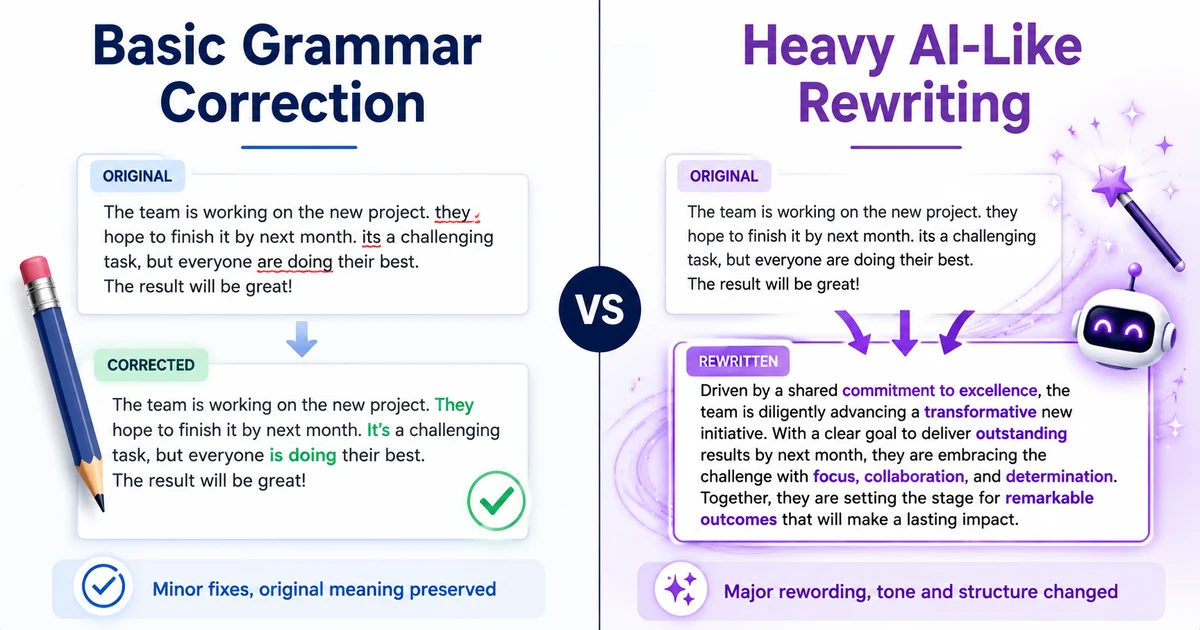
The direct answer is this: basic grammar checking usually does not make a document AI-generated, but heavy rewriting, paraphrasing, tone adjustment, sentence expansion, and AI-assisted suggestions can make writing appear more machine-like to some AI detectors.
A grammar checker does not automatically mean AI misconduct. The real issue is how much the tool changes your writing and whether the final version still reflects your own language, structure, reasoning, and authorship.
This article explains how grammar checkers affect AI detection, which edits are usually safe, which edits are risky, and how students, researchers, universities, and professionals can use tools responsibly.
Key Takeaways
- Simple grammar, punctuation, and spelling corrections are unlikely to be treated as AI writing by themselves.
- AI detectors do not “see” which tool you used. They analyse patterns in the final text.
- Heavy rewriting can make human writing appear more polished, uniform, and AI-like.
- The risk increases when a grammar tool rewrites whole paragraphs, changes tone, simplifies arguments, or generates new sentences.
- For academic work, keep drafts, notes, sources, and revision history.
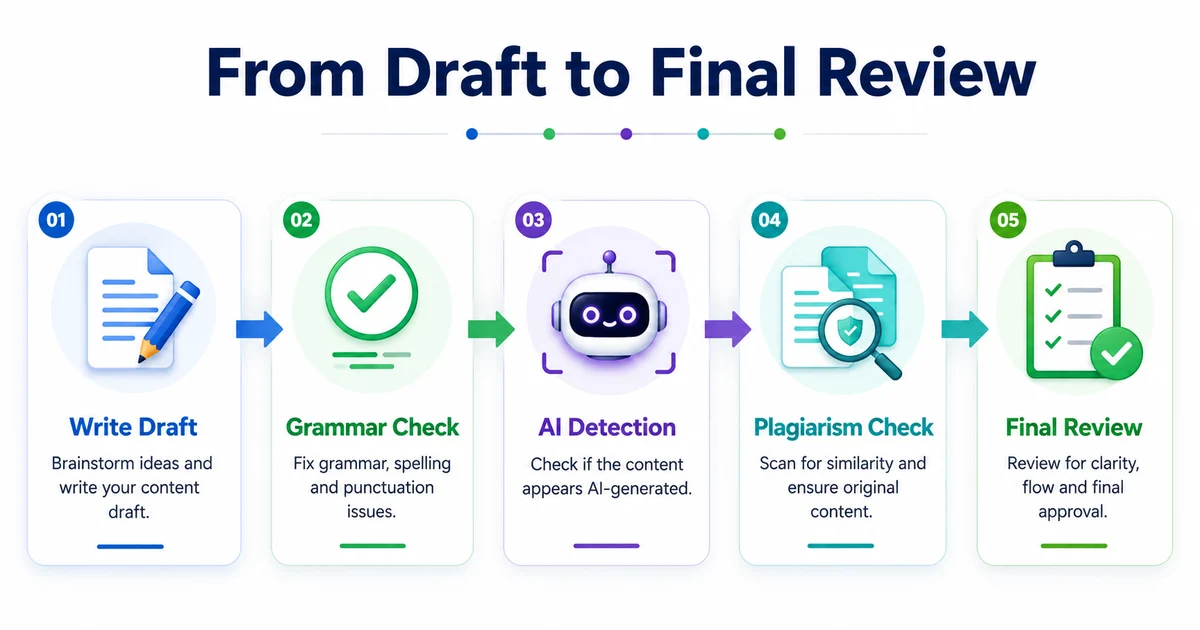
- Use a workflow that separates grammar improvement from AI detection, plagiarism checking, and final review.
What People Usually Mean by “Grammarly AI Checker”
When people search for grammarly ai checker, they are usually asking one of two questions.
First, they may want to know whether Grammarly or a similar tool can check if content is AI-written. Second, they may be worried that using a grammar checker will make their own writing look AI-generated.
The second question is more practical for most students and professionals. A document can be genuinely written by a human, then edited with a grammar tool, and still receive an AI-related warning from a detection platform. That does not necessarily prove that the work was generated by AI. It means the text has patterns the detector associates with machine-generated writing.
This distinction matters. AI detection is not a perfect truth machine. It is a probability-based judgement based on language features. It does not know your intention, your drafting process, your classroom instructions, or how much editing was done.
Can Grammar Checker Be Detected as AI?
A grammar checker itself is not usually “detected” as AI. AI detectors analyse the final text, not the software history behind it.
So the better question is:
Can grammar checker be detected as AI-like writing after it changes the text?
Yes, that can happen in some cases. The more a tool rewrites the language, the more the final version may lose personal style. If the edited text becomes too smooth, too balanced, too generic, or too structurally predictable, an AI detector may score it higher.
For example, this type of correction is usually low risk:
Original: “The results shows that students was more
confident after feedback.”
Edited: “The results show that students were more confident after receiving
feedback.”
The meaning and structure are still the writer’s own. The tool has corrected grammar.
This type of edit is more risky:
Original: “Students improved after feedback because they
understood mistakes better.”
Heavily rewritten: “The findings suggest that constructive academic feedback
plays a significant role in enhancing student confidence, improving reflective
learning practices, and supporting measurable academic development.”
The second version may sound more polished, but it also adds ideas, shifts tone, expands claims, and removes the writer’s natural phrasing. If an entire document is edited this way, it may start looking less like normal human revision and more like generated academic prose.
Why Grammar Tools Can Sometimes Increase AI-Likeness
AI detection systems often look at patterns such as sentence predictability, uniformity, vocabulary distribution, paragraph flow, and stylistic consistency. They do not simply ask, “Was a grammar checker used?”
Grammar tools can affect these patterns in several ways.
1. They make sentences more uniform
Human writing often has uneven rhythm. Some sentences are short. Some are longer. Some are slightly awkward but still meaningful. When a grammar tool smooths every sentence, the writing may become more consistent than a normal first draft.
Consistency is good for clarity, but excessive consistency can look artificial.
2. They remove personal phrasing
Students and professionals often have recognisable habits. They may repeat certain phrases, use discipline-specific wording, or structure arguments in a particular way. Heavy grammar editing can remove these fingerprints.
A corrected sentence is fine. A completely rewritten paragraph may no longer sound like the original author.
3. They replace simple wording with generic formal language
Many grammar and writing tools suggest more formal alternatives. Sometimes this helps. Sometimes it creates vague academic language.
For example:
“This shows the app helped users save time.”
may become:
“This demonstrates that the application contributed to increased operational efficiency among users.”
The second version is not wrong, but if the whole document adopts this tone, it may become generic. AI detectors may treat generic polished prose with suspicion, especially when the argument lacks specific examples or original reasoning.
4. They may add ideas the writer did not include
Some writing assistants do more than grammar correction. They suggest sentence completions, rewrites, summaries, tone changes, and paragraph improvements. At that point, the tool is no longer only correcting grammar. It is helping generate or reshape content.
This is where academic risk increases.
Low-Risk vs High-Risk Grammar Checker Use
Not every use of a grammar checker carries the same risk. The key is the level of intervention.
Low-risk use
Low-risk use normally includes:
- spelling correction
- punctuation correction
- subject-verb agreement
- typo removal
- fixing repeated words
- correcting basic grammar mistakes
- improving minor clarity without changing meaning
Example:
“This research focus on climate change impacts.”
“This research focuses on climate change impacts.”
This is ordinary proofreading.
Medium-risk use
Medium-risk use includes:
- rewriting sentences for clarity
- changing passive voice to active voice
- reducing wordiness
- improving transitions
- simplifying long sentences
Example:
“Due to the fact that many students were unable to
understand the feedback properly, their performance was affected.”
“Many students did not understand the feedback properly, which affected their
performance.”
This is still acceptable in many contexts, but the writer should review the meaning carefully.
High-risk use
High-risk use includes:
- rewriting full paragraphs
- generating introductions or conclusions
- changing the tone of the entire document
- paraphrasing source material
- expanding weak points into full arguments
- producing citations, summaries, or explanations
- making the whole paper sound “more academic”
This crosses from proofreading into content generation or substantial rewriting.
For students, this may conflict with university academic integrity rules. For researchers, it may raise authorship and disclosure concerns. For businesses, it may make brand communication sound less authentic.
Does a Grammar Checker Cause False AI Detection?
It can contribute to a false or misleading AI detection result, especially when the text is short, highly formal, or heavily edited.
A false positive means human-written text is flagged or scored as likely AI-generated. This can happen for many reasons, not only grammar tools. Text may be flagged because it is formulaic, repetitive, overly polished, template-based, or written in a highly standardised style.
Common examples include:
- abstracts
- executive summaries
- reflective statements
- admission essays
- product descriptions
- policy documents
- assignment introductions
- literature review summaries
These formats often use predictable wording even when written by humans.
That is why AI detection should be treated as a signal, not final proof. A responsible review should consider drafts, sources, writing history, assignment context, and the type of tool used.
How Students Should Use Grammar Checkers Safely
Students are often the most worried about grammar tools because universities may use AI detection or academic misconduct review processes.
A sensible approach is to use grammar tools for proofreading, not authorship.
Keep your own argument
Your structure, examples, interpretation, and analysis should come from you. A grammar tool can help clean the language, but it should not decide what your assignment argues.
Avoid one-click full-document rewriting
Full-document rewriting may produce a cleaner submission, but it can also remove your voice. It may also make it difficult to explain your writing process if questioned.
Save your drafts
Keep earlier versions of your work. Drafts show development. They can help demonstrate that the final document came from your own research and thinking.
Useful evidence may include:
- outline notes
- rough drafts
- source notes
- supervisor feedback
- document version history
- handwritten planning
- screenshots of edits where appropriate
Check before submitting
Before final submission, students can run the work through the WordBinary AI detector to review whether the text appears overly AI-like. This should not be used to “beat” a detector. It should be used as a quality check to identify sections that may need more personal reasoning, clearer evidence, or less generic wording.
Students can also use the WordBinary plagiarism checker to review originality and source overlap before submission.
How Universities Should Interpret Grammar-Edited Writing
Universities need a balanced approach. Many students use grammar support because English may be their second or third language. Others use it because they want to remove avoidable mistakes.
Treating all grammar-assisted writing as suspicious would be unfair. At the same time, universities need to distinguish proofreading from AI-generated authorship.
A practical academic integrity review should ask:
- Did the student only correct grammar, spelling, and clarity?
- Did the tool generate new arguments or content?
- Does the student understand the submitted work?
- Are sources used correctly?
- Is the writing style consistent with earlier submissions?
- Are drafts or version history available?
- Does the institution’s policy clearly explain acceptable tool use?
This is where a single AI score is not enough. Universities should review the broader evidence.
For institutions comparing detection and originality workflows, WordBinary’s Turnitin alternative page explains how a combined approach to AI detection, plagiarism checking, and grammar review can support academic integrity without relying on one signal alone.
How Researchers and Professionals Should Think About It
Researchers, business owners, and professionals often use grammar tools for legitimate reasons. A research paper may need cleaner academic language. A business proposal may need clearer tone. A report may need stronger readability.
The question is not whether grammar tools are allowed in every case. The question is whether their use changes authorship.
For professional writing, grammar checking is usually acceptable when it improves clarity without changing substance. For academic and research writing, expectations may be stricter, especially around AI-assisted rewriting and disclosure.
A safe professional workflow looks like this:
- Write the first draft yourself.
- Use grammar checking for correction and clarity.
- Reject suggestions that add unsupported claims.
- Keep technical meaning unchanged.
- Review the final document manually.
- Use AI and plagiarism checks as final risk reviews.
WordBinary’s grammar checker can be used as part of this kind of review process, especially when writers want to improve readability while still keeping ownership of the content.
Practical Examples: What Looks Safer and What Looks Riskier
Example 1: Safe grammar correction
Original:
“The survey was conduct among 100 students and the result was useful.”
Edited:
“The survey was conducted among 100 students, and the result was useful.”
This is a normal correction. The sentence is still basic, but grammatically improved.
Example 2: Better clarity without over-editing
Original:
“The survey was conducted among 100 students and it helped us know that feedback matters in improving confidence.”
Edited:
“The survey of 100 students showed that feedback can help improve confidence.”
This is clearer and still close to the original meaning.
Example 3: Riskier AI-like rewriting
Original:
“The survey was conducted among 100 students and it helped us know that feedback matters in improving confidence.”
Heavily rewritten:
“The survey findings indicate that structured feedback mechanisms play a meaningful role in strengthening learner confidence, enhancing academic engagement, and supporting evidence-based improvement across educational settings.”
This version sounds more advanced, but it introduces broader claims that were not clearly present in the original. If a tool repeatedly rewrites text this way, the document may look less human and more AI-assisted.
How to Reduce the Risk of Grammar-Edited Text Being Flagged
The best solution is not to add deliberate mistakes. Poor grammar does not prove human authorship. Instead, focus on making the writing more specific, evidence-based, and personally reasoned.
Add specific examples
AI-like writing often becomes broad and general. Add concrete examples from your reading, data, case study, experiment, or project.
Keep discipline-specific judgement
Do not let a tool flatten technical meaning. In academic and professional writing, your judgement matters more than polished wording.
Avoid unnecessary formal inflation
Do not replace every simple phrase with a formal phrase. “Shows” is often better than “demonstrates the presence of”. “Use” is often better than “utilise”.
Review paragraph-level logic
Grammar tools fix sentences. They do not always fix argument quality. A paragraph can be grammatically correct but weak, repetitive, or unsupported.
Check final text with multiple lenses
Before submitting or publishing, review:
- grammar
- originality
- source use
- AI-likeness
- clarity
- factual support
- tone
WordBinary’s pricing page can help users choose a plan if they need regular checks across AI detection, plagiarism review, and grammar improvement.
For broader guides and writing support, users can also visit the WordBinary resources section.
Mistakes to Avoid
Mistake 1: Assuming grammar checking is the same as AI writing
Correcting grammar is not the same as generating an assignment, article, proposal, or paper. The level of tool involvement matters.
Mistake 2: Trusting every suggestion
Grammar tools can misunderstand technical terms, legal meaning, discipline-specific phrasing, and academic nuance. Always review suggestions manually.
Mistake 3: Making the whole document sound identical
If every paragraph has the same rhythm, tone, and structure, the writing may feel less natural. Good human writing has controlled variation.
Mistake 4: Removing all personal voice
For reflective writing, personal statements, case analysis, and discussion sections, your voice is part of the value. Do not edit it out completely.
Mistake 5: Using AI detection only at the end
If a document is heavily rewritten at the final stage, it may be hard to restore the original voice. Check earlier, revise carefully, and keep drafts.
So, Should You Use a Grammar Checker?
Yes, but use it carefully.
A grammar checker is useful when it helps you correct errors, improve readability, and communicate more clearly. It becomes risky when it starts replacing your thinking, rewriting your argument, or generating polished paragraphs that no longer sound like you.
For students, the safest rule is simple: use grammar tools for correction, not creation.
For universities, the fair approach is to separate ordinary language support from AI-generated authorship.
For professionals, the best approach is to preserve substance, accuracy, and brand voice while using grammar tools as a final editing layer.
Conclusion
Searches for grammarly ai checker often come from a genuine worry: people want to write clearly without being accused of using AI. The answer is not to avoid grammar checking completely. The answer is to understand the difference between proofreading and rewriting.
Basic grammar correction usually carries low risk. Heavy rewriting, paragraph generation, tone transformation, and idea expansion carry higher risk because they can make the final text look more AI-like.
If you want a safer workflow, write the content yourself, use grammar checking carefully, keep your drafts, and review the final document for AI-likeness, plagiarism, and clarity. WordBinary can support that process through its AI detector, plagiarism checker, and grammar checker, helping users make informed decisions before submission or publication.