WordBinary Blog
AI Detector with Report: What Students Should Look For Before Submission
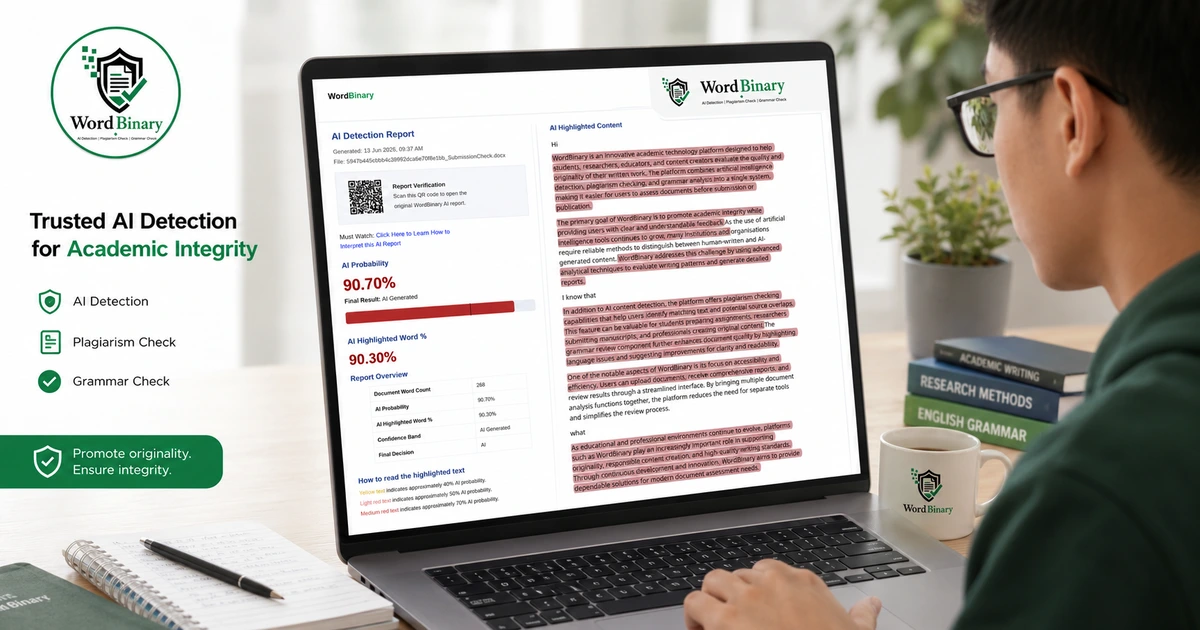
Submitting an assignment now feels different from how it did a few years ago. Even when you have written the work yourself, you may still worry about whether your writing sounds too polished, too structured, or too similar to AI-generated text. For students, researchers and professionals, the bigger issue is not only checking an AI score. It is having a clear, reviewable report that explains what was detected, where it was detected, and how seriously the result should be treated.
That is why many users now search for an AI detector with report rather than a basic AI percentage checker. A plain score can create confusion. A proper report gives context. It helps you review highlighted sections, compare document-level and sentence-level results, identify risky writing patterns, and keep a record before final submission.
This article explains what students should look for in an AI detector report, why a downloadable PDF matters, what mistakes to avoid, and how to use the result responsibly.
Key Takeaways
An AI score should be treated as a review signal, not a final judgement.
A useful report should show document-level results, sentence-level highlights, confidence indicators and practical interpretation.
A downloadable PDF report is helpful when you need a record for supervisors, academic review, internal compliance, or personal revision.
Students should avoid rewriting blindly just to reduce an AI score, because heavy paraphrasing can make writing less authentic.
The best workflow combines AI detection, plagiarism checking, grammar review and human judgement.
Why Students Need More Than a Basic AI Score
A simple AI percentage may look attractive because it gives an instant answer. The problem is that it rarely tells you enough.
Imagine a student checks a 3,000-word essay and sees “42% AI”. What does that actually mean? Does it mean almost half the paper is AI-written? Does it mean certain paragraphs are highly predictable? Does it include the references? Are headings, definitions, formulaic phrases or methodology descriptions affecting the result?
Without a proper report, the student is left guessing.
This is why a reliable AI detector should not only produce a score. It should help the user understand the result. A meaningful report allows you to ask better questions:
- Which sections look risky?
- Are the highlighted parts genuinely AI-like, or are they standard academic phrases?
- Is the result based on the whole document or selected text?
- Are there sentence-level signals?
- Does the report explain limitations?
- Can the result be downloaded and reviewed later?
This matters because AI detection is not perfect. Turnitin’s own guidance says an AI writing report may misidentify human, AI-generated and AI-paraphrased text, and should not be the sole basis for adverse action against a student. OpenAI also withdrew its public AI classifier in 2023 because of a low accuracy rate, while noting that AI classifiers should be used as a complement to other methods rather than as a primary decision-making tool.
For students, the lesson is simple: do not panic over a score. Review the evidence.
What an AI Detector with Report Should Actually Show
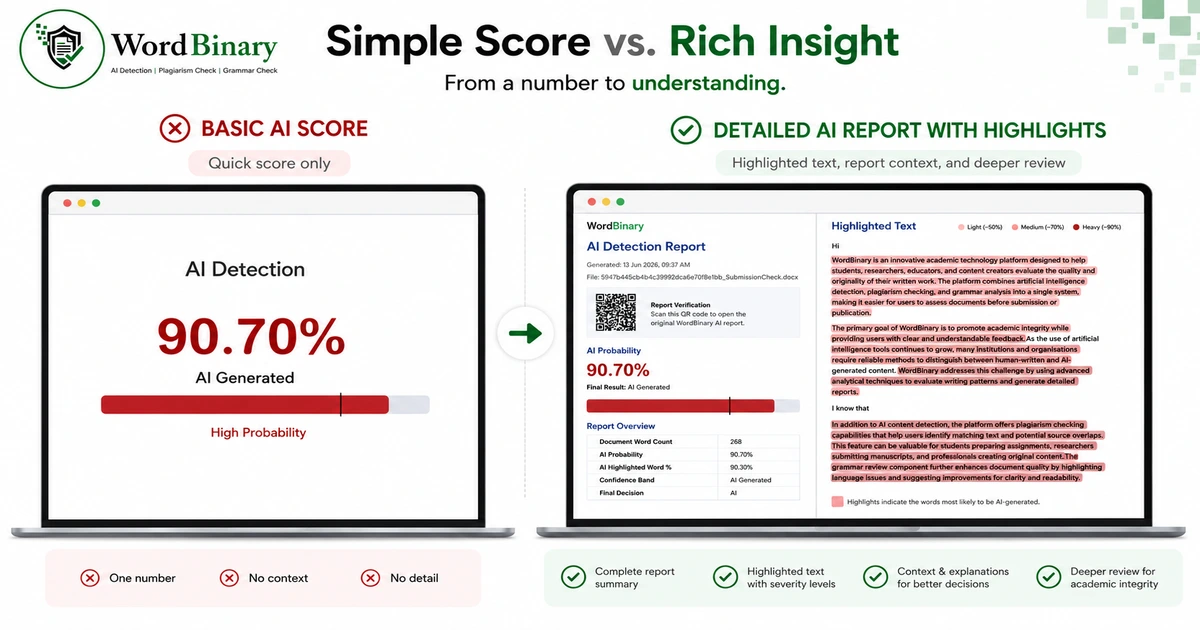
A good AI detector with report should make the result easier to understand, not more frightening. The report should be designed for review, not just for display.
1. Overall AI Percentage
The overall AI percentage is the starting point. It tells you how much of the document appears to contain AI-like writing patterns according to the tool’s model.
However, the score should not be read in isolation. A 20% result in one document may be less serious than a 20% result in another, depending on where the flagged content appears. For example, a methods section, definition-heavy introduction, or repetitive business description may naturally contain predictable phrasing.
A good report should explain whether the score is low, moderate, high or very high, and what that means in practical terms.
2. Sentence-Level or Paragraph-Level Highlights
Highlights are often more useful than the score itself. If the report marks specific sentences or paragraphs, the student can inspect the writing directly.
For example:
- A flagged sentence in the conclusion may be too generic.
- A flagged paragraph in the literature review may be overly polished and unsupported.
- A flagged section in the methodology may simply use standard academic language.
- A flagged explanation may need more personal reasoning, data, examples or references.
This is where a report becomes genuinely useful. Instead of asking, “How do I reduce the score?”, the better question is, “Which parts need more authentic academic work?”
3. Confidence or Risk Level
A proper AI checker with PDF should separate strong signals from moderate signals. Not every highlighted sentence carries the same weight.
Some text may look strongly AI-generated because it has predictable structure, repetitive phrasing, balanced clauses and generic explanation. Other text may only show mild AI-like patterns because it is formal, polished or grammatically uniform.
For students, this difference matters. A report that treats every highlighted line equally can create unnecessary anxiety. A better report helps users prioritise.
4. Document-Level and Sentence-Level Interpretation
Students often misunderstand AI reports because they do not separate document-level and sentence-level analysis.
Document-level analysis looks at the writing pattern across the whole file. Sentence-level analysis looks at individual lines or passages. Both are useful, but they answer different questions.
A document may have a moderate overall score because a few sections are heavily flagged. Another document may have low-level AI-like signals spread throughout the text. The revision strategy is different in each case.
If the report explains both levels, the student can make better decisions.
5. Clear PDF Download
A downloadable PDF report is especially useful for academic and professional contexts. Students may need to show a supervisor that they reviewed the document before submission. Researchers may need to keep a record of originality checks. Business owners may want to document content review before publishing website copy, proposals or marketing material.
An AI checker with PDF is also more practical than a temporary browser result. A PDF can be saved, shared internally, attached to a compliance record, or compared with later versions of the same document.
Why a PDF Report Is Better Than a Screenshot
Screenshots are weak evidence. They can crop out context, miss highlighted sections, and fail to show the full document review.
A PDF report is stronger because it can include:
- Document name and scan summary
- Overall AI score
- Highlighted AI-like sections
- Sentence-level detail
- Interpretation notes
- Time of review
- Tool or platform branding
- Downloadable record for future reference
For students, this is useful before submission. For universities, it helps create a clearer review trail. For researchers and professionals, it supports transparency.
This does not mean a PDF report proves misconduct or proves innocence. It means the review process becomes more organised.
Practical Example: How a Student Should Read an AI Report
Suppose a student uploads a 2,500-word management assignment and receives a 37% AI score.
A poor reaction would be:
“I need to paraphrase everything until the score becomes zero.”
A better reaction would be:
“Let me check which sections are highlighted and why.”
The student opens the report and notices that most highlights are in the introduction and conclusion. The body paragraphs, case analysis and references are mostly clear. This suggests that the generic opening and closing may need improvement, not that the whole assignment is AI-written.
The student then revises the introduction by adding:
- A clearer link to the assignment question
- Specific context from the case study
- More precise definitions
- A short explanation of their own argument
- Better references where needed
The conclusion is revised to summarise the actual findings rather than using broad phrases such as “this shows the importance of effective management”.
After this, the work becomes stronger academically. The goal was not to trick the detector. The goal was to improve originality, specificity and ownership.
What Students Should Avoid When Using an AI Checker with PDF
Do not chase a perfect 0% score
A 0% score may feel safe, but it should not become the only objective. Academic writing can be formal and predictable. Some legitimate human-written text may still be flagged.
OpenAI’s classifier notes included limitations such as unreliable performance on short texts, the possibility of confidently mislabelling human-written text, and weaker performance outside English. Research has also raised concerns that AI detectors may misclassify non-native English writing, which is especially relevant in Indian academic English and international student contexts.
Do not use rewriting tools blindly
Many students try to reduce AI scores by running text through paraphrasing tools. This can create new problems.
The writing may become unnatural. Meaning may change. Citations may no longer support the rewritten claim. The assignment may lose the student’s voice. In some cases, AI-paraphrased writing may still be detected by advanced systems.
A better approach is to revise manually. Add your own reasoning. Use examples from your lecture, case study, data, fieldwork or reading. Replace generic claims with specific analysis.
Do not ignore plagiarism and grammar
AI detection is only one part of document review. A student can have a low AI score but still have poor citation practice, copied phrasing, weak grammar or unclear argumentation.
That is why a stronger workflow combines AI review with a Plagiarism checker and Grammar checker. This gives a more complete view of submission risk.
Do not treat the report as a disciplinary verdict
A report is a tool for review. It is not a court judgement. Even established academic integrity platforms warn that AI detection results require human judgement and institutional policy context.
If a university uses AI detection, the result should ideally be considered alongside drafts, version history, references, writing process, viva questions, supervision notes and the student’s explanation.
How Universities and Supervisors May Use AI Reports
Universities are still developing policies around generative AI. Some allow limited AI use for brainstorming or grammar support. Others restrict AI use unless it is declared. Some departments may have different rules within the same university.
QAA in the UK maintains resources to help higher education providers engage with generative AI while securing academic standards. UNESCO’s guidance also frames generative AI in education around protecting human agency and benefiting learners, teachers and researchers.
For students, this means one thing: always check your university’s AI policy before using AI tools.
An AI report is most helpful when it supports a transparent process. For example, a student might use it to review whether their writing has become too generic after using AI for brainstorming. A supervisor might use it as one input in a wider conversation about authorship. A researcher might use it as part of a publication-readiness workflow.
What to Look for Before Choosing an AI Detector with Report
Accuracy with explanation
No AI detector should claim perfect certainty. Look for a tool that explains results clearly and avoids unsupported claims.
PDF report download
For academic and professional users, PDF export is essential. It gives you a record that can be saved and reviewed later.
Highlighted text
The report should show where the issue appears. A score without highlights is less useful.
Clear distinction between AI, plagiarism and grammar
AI detection, plagiarism checking and grammar review are different tasks. A good platform should not confuse them.
Student-friendly interpretation
Students need practical guidance, not fear-based messaging. The report should help users understand what to review.
Privacy and file handling
Students, researchers and businesses often upload sensitive documents. Check whether the platform gives clear information about document handling, storage and access.
Pricing transparency
Before using any paid tool, check whether pricing is clear. WordBinary’s Pricing page can help users compare available options before choosing a workflow.
Where WordBinary Fits In
WordBinary is built for users who need more than a quick AI score. It brings AI detection, plagiarism checking and grammar review into a more practical document review workflow.
Students can use WordBinary’s AI detector to review AI-like writing patterns before submission. Users who also want originality review can use the Plagiarism checker, while grammar and spelling issues can be checked through the Grammar checker.
For users comparing academic integrity tools, WordBinary also provides a Turnitin alternative page explaining how its workflow may support students, educators, researchers and independent professionals. Additional learning materials are available in the Resources section, including guidance on AI scores, false positives, sentence highlights and ethical AI use.
The best use of WordBinary is not to “beat” detection. It is to review your document more responsibly before it reaches a marker, supervisor, client or publication platform.
Final Checklist Before You Trust an AI Report
Before relying on any AI detector report, ask:
- Does it show an overall score?
- Does it highlight specific text?
- Does it explain the score in plain language?
- Does it allow PDF download?
- Does it separate AI detection from plagiarism and grammar?
- Does it warn about limitations?
- Does it help you revise thoughtfully rather than panic?
- Does it respect academic context and human judgement?
If the answer is yes, the report is likely to be more useful than a basic percentage result.
Conclusion
Choosing an AI detector with report is not only about finding out whether a document has AI-like text. It is about understanding the evidence, reviewing the highlighted sections, and making better decisions before submission.
Students should look for clear PDF reports, sentence-level highlights, practical interpretation, privacy awareness and a workflow that also supports plagiarism and grammar review. A good AI checker with PDF should help you improve your work, not simply scare you with a number.
WordBinary can support this process by giving students, researchers and professionals a structured way to review AI risk, originality and writing quality before sharing or submitting their documents.